
[Description]
Why the HDD status shows high temperature warning?
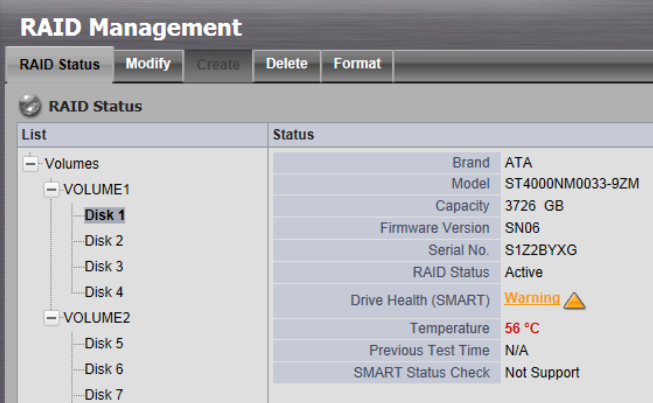
[Root Cause]
- The ambient's issue
- Fans do not work
- Hard drive has bad sectors
[Solution]
1. Please follow below steps to solve the temperature issue:
Steps 1: Shut down the NVR.
Steps 2: Open the case of the unit then clean the dust.
Steps 3: Follow below recommended values to adjust the air condition.
- Surrounding: (refer to Wiki)
- Temperature: 18-27°C (64-80°F)
- Humidity: 40%-60% rH
- CPU: 45-50 °C
- HDD: 5-50°C (refer to Seagate website)
Steps 4: Check the CPU and HDD temperature on NVR's web.
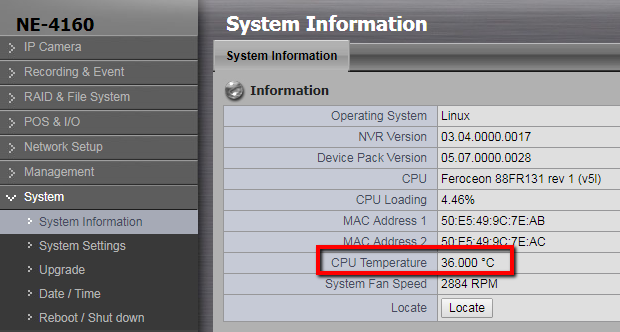
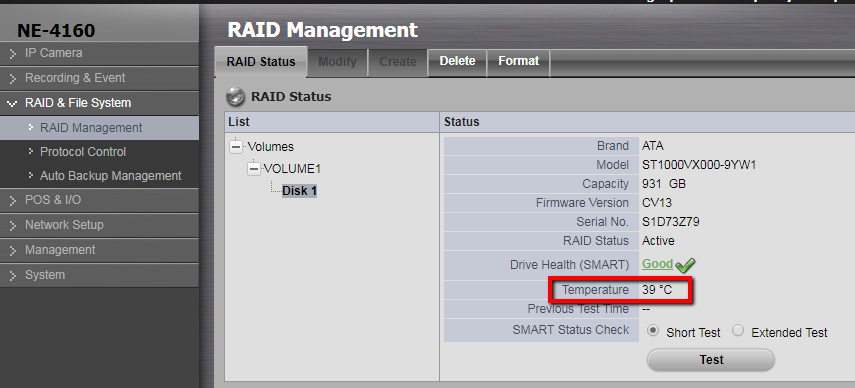
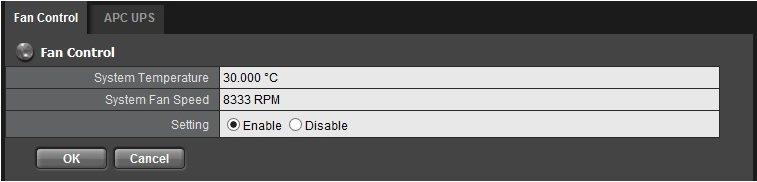
2. Please disable the fan speed on "System>System Settings>Smart Fan (in Crystal it named "Fan Control")".
- Enable: System will detect the temperature and adjust the fan rpm.
- Disable: System will request fan running as the maximum speed of rotation.
3. Please refer to this Wiki How to check the HDD health?
Comments
0 comments
Please sign in to leave a comment.