
LDAP support is available in Crystal v3.6 and above. LDAP is only available when using ULTIMATE license
LDAP 支援在Crystal v3.6 和以上提供。LDAP 僅在使用Ultimate License 時可用
Usage:
1. Connect to a MSAD server
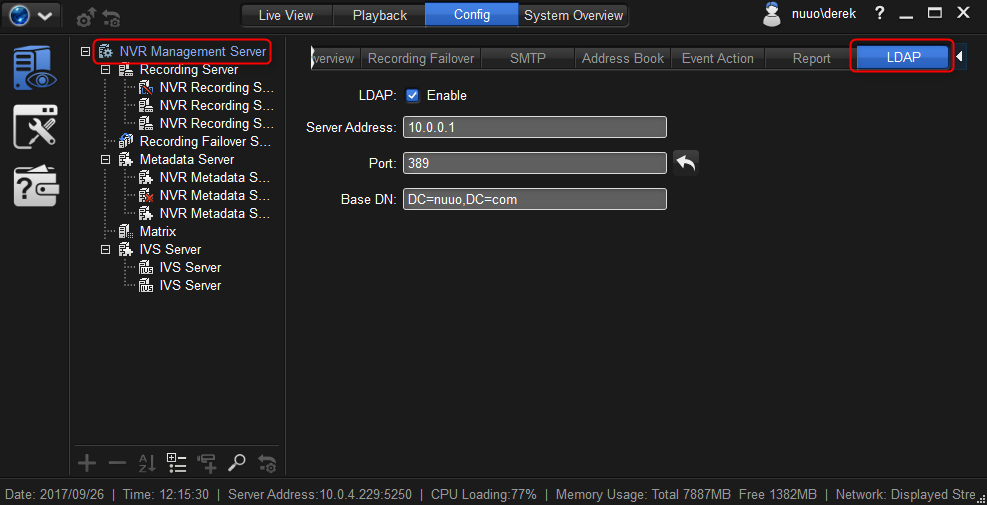
a. Please go to Config > Management Server > LDAP
b. Please enable LDAP
c. Enter address, port, and base DN.
(please refer to the following example)
(where to find base DN: https://www.youtube.com/watch?v=gScQtjck8CY)
使用:
1. 連接到 MSAD 伺服器
a. 請轉到設定> 管理伺服器 >> LDAP
b. 請啟用 LDAP
c. 輸入位址、埠號和基本 Domain Name。
(請參閱以下示例)
(在哪裡可以找到基本 DN: HTTPs://www.youtube.com/watch?v=gScQtjck8CY)
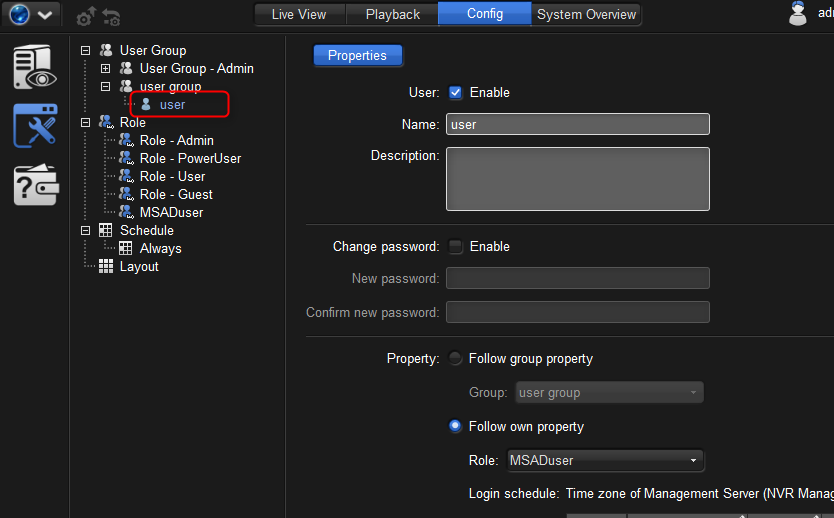
2. Add “user”
Please add an account named “user”. The name must be “user” and cannot be replaced.
Please note:
The account “user” represents any users coming from the MSAD server.
The account “user” can be added in any user group.
Any MSAD user will have exactly the same privilege/permission as the account “user”.
2. 添加 "使用者"
請添加一個名為 "使用者" 的帳戶。名稱必須是 "使用者", 不能替換。
請注意:
帳戶 "使用者" 表示來自 MSAD 伺服器的任何使用者。
可以在任何使用者組中添加帳戶 "使用者"。
任何 MSAD 使用者都具有與帳戶 "使用者" 完全相同的許可權/許可權。
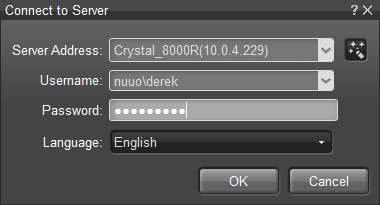
3. Login
Please add “domain name” before the MSAD account. For example: nuuo\derek
請在 MSAD 帳戶之前添加 "網域名稱"。例如: nuuo \ Derek
Done.
Comments
0 comments
Please sign in to leave a comment.